

Xero, QuickBooks Online, Sage One: best pick for SA SMEs
For most South African sole proprietors and freelancers, Sage Business Cloud Accounting (still widely searched as Sage One) is the most affordable entry point. Payroll-heavy SMEs get the most complete local compliance coverage from QuickBooks Online paired with a dedicated SA payroll integration. Growing multi-user businesses tend to land on Xero for its unlimited-user model and deep integration ecosystem. Whichever platform you’re evaluating, Xero, QuickBooks Online, and Sage One each cover the core SARS compliance basics — VAT return exports, bank feeds, and audit trails — so the real decision comes down to cost shape, user seats, and payroll fit.
- Best for sole proprietors and freelancers: Sage Business Cloud Accounting (lowest entry price, simple invoicing, 30-day free trial)
- Best for payroll-heavy SMEs: QuickBooks Online (strong payroll partner ecosystem, VAT reporting, familiar interface)
- Best for growing multi-user teams: Xero (unlimited users on most plans, large app marketplace, cloud accounting benefits that scale with you)
Not sure which fits your numbers? Readyaccounting works with South African SMEs at every stage to match the right platform to your compliance needs. Get in touch before you commit to a subscription.
Pro Tip: Before signing up for any plan, confirm whether your accountant is already certified on that platform. A SAICA or SAIPA-registered accountant who knows Xero will save you hours at year-end compared to one who has to learn the software alongside you.

Table of Contents
- How do Xero, QuickBooks Online, and Sage One compare side by side?
- What will you actually pay in South Africa? Pricing and plan breakdown
- Does each platform handle South African payroll and VAT properly?
- Which South African banks have feeds, and how does the integration ecosystem work?
- How long does onboarding take, and will your accountant find it easy to use?
- What reports do you get, and are they good enough for AFS and CIPC filings?
- How do you choose? A practical checklist and trial test plan
- How Readyaccounting implements cloud accounting for South African SMEs
- Key takeaways
- What most business owners get wrong when choosing cloud accounting software
- Readyaccounting: managed cloud accounting for South African SMEs
- Useful sources and vendor pages for further reading
How do Xero, QuickBooks Online, and Sage One compare side by side?
| Dimension | Xero | QuickBooks Online | Sage Business Cloud Accounting |
|---|---|---|---|
| Best for | Growing multi-user SMEs | Payroll-heavy businesses | Sole proprietors, small traders |
| Starting price (ZAR, approx.) | R795 | R708 | R435 |
| Included users | Unlimited (most plans) | Limited per plan | Limited per plan |
| Payroll | Third-party partner (e.g. PaySpace, SimplePay) | Third-party partner; strong SA integrations | Built-in payroll module available |
| VAT & SARS reporting | VAT return exports, audit trail | VAT return exports, audit trail | VAT return exports, local compliance focus |
| SA bank feeds | Major SA banks via direct/aggregated feeds | Major SA banks supported | Major SA banks supported |
| Integrations / app ecosystem | 1,000+ apps globally; strong SA coverage | Large ecosystem; SA payroll and POS options | Solid SA-focused integrations; inventory strength |
| Reporting & AFS readiness | Trial balance, P&L, balance sheet; accountant exports | Comprehensive reports; accountant-friendly | Inventory and accountant views; AFS-ready exports |
| Accountant adoption (SA) | High; large SAICA/SAIPA partner network | High; widely used by SA bookkeepers | High; long-standing SA market presence |
| Security | MFA, automatic backups, cloud-native | MFA, cloud-hosted, role-based access | MFA, cloud-hosted, role-based access |
Xero trade-offs:
- Unlimited users is a genuine long-term cost advantage for growing teams
- Payroll requires a third-party integration — budget for that add-on from day one
QuickBooks Online trade-offs:
- Slightly higher entry price, but the payroll partner ecosystem is mature in South Africa
- Per-seat licensing can get expensive as your team grows past three or four users
Sage Business Cloud Accounting trade-offs:
- The most affordable entry point for small businesses, with a built-in payroll option
- Fewer global integrations than Xero, though SA-specific coverage is solid
Pro Tip: Licensing model — unlimited users versus per-seat — is often the single biggest long-term cost differentiator. Run a 12-month projection that includes every user who will need access, not just the owner.
Pro Tip: Sage is still widely searched as “Sage One,” but the product is now officially called Sage Business Cloud Accounting. When you contact Sage support or a reseller, use the current name to avoid confusion with legacy product tiers.
What will you actually pay in South Africa? Pricing and plan breakdown
Pricing across all three platforms is subscription-based and quoted in ZAR for South African customers. The numbers below are drawn from reseller comparison tables and vendor pages — treat them as approximate starting points, since vendors adjust pricing periodically.
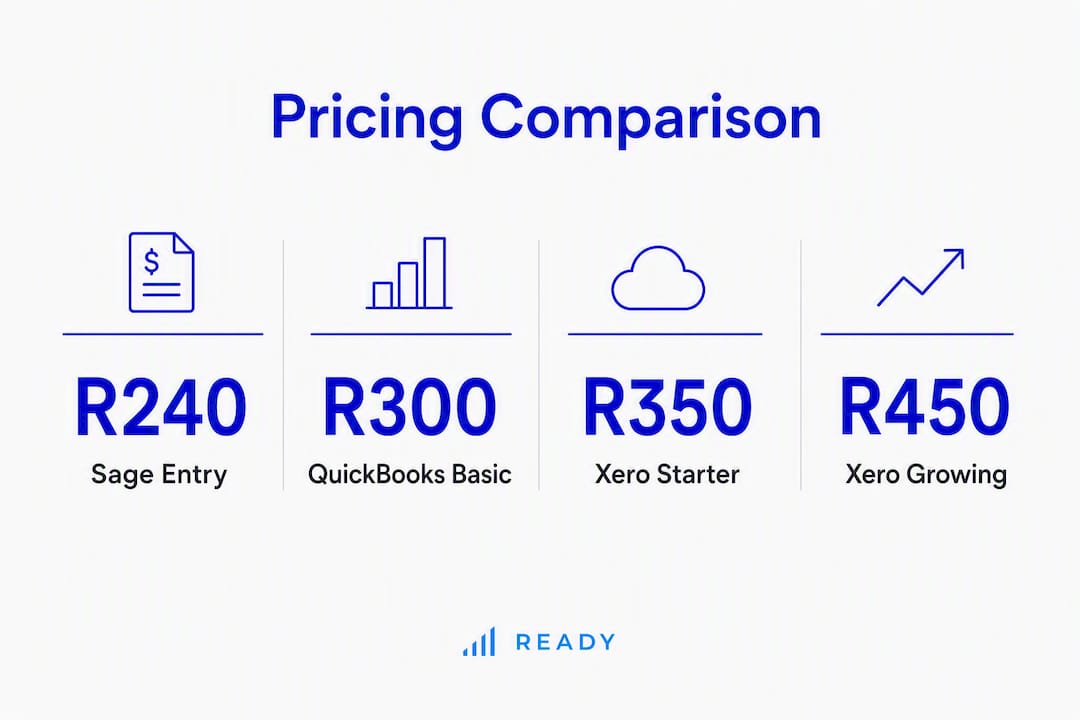
Typical monthly cost by business scenario
| Business scenario | Xero | QuickBooks Online | Sage Business Cloud |
|---|---|---|---|
| Sole proprietor, basic invoicing | Entry-level plan | Entry-level plan | Entry-level plan |
| VAT-registered SME (mid plan) | Mid-tier plan | Mid-tier plan | Mid-tier plan |
| Payroll-heavy (plan + payroll add-on) | Base plan plus payroll partner fee | Base plan plus payroll partner fee | Base plan plus payroll module or partner |
Key cost drivers to watch:
- User seats: Xero’s unlimited-user model means your monthly cost stays flat as the team grows. QuickBooks Online and Sage charge per seat or cap included users, so a team of five pays materially more than a team of two.
- Payroll modules: None of the three platforms includes full SA payroll at no extra cost on base plans. Budget for a payroll partner (SimplePay, PaySpace, or similar) or a built-in payroll add-on.
- Multi-currency: If you invoice in USD or EUR, confirm whether your plan includes multi-currency or whether it’s a paid upgrade.
- Third-party app subscriptions: Inventory, POS, and project management apps each carry their own monthly fees on top of your accounting subscription.
Sage Business Cloud Accounting pricing in South Africa typically starts from about R240/month for the entry-level plan, with higher tiers around R435/month, and a 30-day free trial offered by Sage.
Pro Tip: Build a 12-month cost model before you sign up. Add your base plan, payroll partner, any extra user seats, and your accountant’s access fee. The platform that looks cheapest at month one is sometimes the most expensive by month twelve.
Does each platform handle South African payroll and VAT properly?
This is where the decision gets real for most SA business owners. All three platforms support SARS compliance through VAT return exports, automated bank feeds, and audit trails — but payroll is a different story.
Payroll support
- Xero does not include built-in SA payroll. You connect a payroll partner (SimplePay and PaySpace are popular choices) via API. The integration is clean, but it’s an additional monthly cost and an additional vendor relationship to manage.
- QuickBooks Online similarly relies on third-party payroll partners for full SA payroll compliance, including PAYE, UIF, and SDL calculations. The partner ecosystem is mature, and most SA bookkeepers know how to set it up.
- Sage Business Cloud Accounting offers a built-in payroll module for South Africa, which covers PAYE, UIF, SDL, and IRP5 generation. For businesses that want one vendor for both accounting and payroll, this is a genuine advantage.
VAT and SARS reporting
All three platforms generate VAT return exports and maintain audit trails that support SARS record-keeping requirements. What they don’t do is file your VAT return for you — you or your accountant still submits through eFiling.
Common compliance questions:
Do these platforms replace a tax accountant? No. Software handles the record-keeping and reporting; a registered tax accountant handles SARS submissions, AFS compilation, and any disputes. For VAT registration, CIPC filings, and complex tax matters, you still need a professional.
What if I’m not VAT-registered yet? All three platforms let you run without VAT features and switch them on when you register. Confirm with your accountant when your turnover triggers the VAT registration threshold.
Red flags to watch: A platform that can’t export a VAT audit trail in a format your accountant recognises, or one that doesn’t support your SA bank’s feed, will create manual work every month. Test both before you commit.
Pro Tip: Ask your accountant which platform they use most often with SA clients. A SAIPA or SAICA-registered accountant who works in your chosen platform daily will catch errors faster and close your books quicker at year-end.
Which South African banks have feeds, and how does the integration ecosystem work?
Bank feeds are the backbone of daily reconciliation. A broken or delayed feed means manual imports, which defeats the purpose of cloud accounting.
SA bank feed coverage
| Bank | Xero | QuickBooks Online | Sage Business Cloud |
|---|---|---|---|
| Standard Bank | Direct feed | Direct/aggregated | Supported |
| FNB | Direct feed | Direct/aggregated | Supported |
| Absa | Direct feed | Direct/aggregated | Supported |
| Nedbank | Direct feed | Direct/aggregated | Supported |
| Capitec (Business) | Aggregated feed | Aggregated feed | Supported |
All three platforms support the major SA banks, though the feed type varies. Direct feeds update automatically; aggregated feeds (via providers like Yodlee or similar) may have a 24-hour delay and occasionally break when banks update their security protocols.
Practical consequences for your bookkeeping:
- A direct feed means reconciliation can happen daily with minimal manual effort.
- An aggregated feed works well most of the time but requires periodic re-authentication and occasional manual CSV imports when the connection drops.
- Whichever platform you choose, test the bank feed for your specific account type during the trial period — business accounts and personal accounts sometimes behave differently.
Integration ecosystem
Xero’s app marketplace is the largest of the three, with over 1,000 integrations globally. For SA businesses, the relevant ones include payroll partners (SimplePay, PaySpace), payment gateways (PayFast, Peach Payments), inventory systems, and POS connectors. QuickBooks Online has a similarly broad ecosystem with strong SA payroll and retail coverage. Sage Business Cloud focuses on SA-specific integrations, with particular strength in inventory management.
For freelancers weighing up online bookkeeping options, the integration depth matters less than the bank feed reliability and invoicing simplicity.
How long does onboarding take, and will your accountant find it easy to use?
Onboarding a cloud accounting platform is not a one-afternoon job, but it’s also not a months-long project if you plan it properly.
Typical onboarding steps for a small SA business:
- Import or rebuild your chart of accounts (most platforms accept CSV imports or have SA-standard templates)
- Enter opening balances as at your chosen go-live date
- Connect your bank feed and import historical transactions for the current period
- Set up VAT settings, tax codes, and reporting periods
- Invite your accountant or bookkeeper with the appropriate permission level
- Run a test VAT return for a closed period and confirm the output matches your previous records
Time-to-live estimates: A sole proprietor with clean records can be live in one to two days. A business migrating from desktop software (Pastel, Sage 50) with multiple accounts, employees, and historical data should budget one to three weeks, including accountant review of opening balances.
Accountant adoption is high for all three platforms in South Africa. Xero has a particularly active partner network of SAICA and SAIPA-registered accountants. QuickBooks Online is familiar to most SA bookkeepers. Sage has the longest local history and a large installed base.
Pro Tip: During your 30-day trial, run three specific checks: (1) invite your accountant and confirm they can access the reports they need without calling you; (2) generate a VAT return for a sample period and compare it to your last manual return; (3) export a trial balance and confirm your accountant can import it into their AFS compilation tool. If any of these fail, that’s a migration risk worth resolving before you go live.
What reports do you get, and are they good enough for AFS and CIPC filings?
Cloud accounting software produces the raw material for your Annual Financial Statements — it doesn’t produce the AFS itself. That distinction matters.
Core reports available on all three platforms:
- Trial balance (essential for AFS compilation)
- Profit and loss statement (income statement)
- Balance sheet
- VAT audit trail and VAT return summary
- Accounts receivable and payable ageing
- Bank reconciliation report
Sage Business Cloud Accounting adds a fixed assets register and inventory-focused reporting that’s useful for product-based businesses. Xero’s reporting is highly customisable and exports cleanly to Excel, which most SA accountants prefer for AFS compilation. QuickBooks Online offers a broad report library with good drill-down capability.
For multi-entity businesses or those with import/export operations, Xero handles multi-currency most cleanly of the three, with real-time exchange rate updates and currency gain/loss tracking. Sage and QuickBooks Online also support multi-currency, but check whether your specific plan tier includes it.
What your accountant will still need to do after the software does its part: post year-end adjustments, compile the AFS in the required format, handle CIPC annual return filings, and manage any SARS correspondence. Cloud accounting makes their job faster — it doesn’t replace them.
Accountants commonly recommend cloud accounting because it enables real-time collaboration with clients, reducing friction at year-end and keeping records audit-ready for SARS.
How do you choose? A practical checklist and trial test plan
Selection checklist (prioritised for SA businesses)
- SARS compliance: Does the platform export VAT returns and maintain an audit trail your accountant can work with?
- Payroll: Do you need built-in payroll, or are you comfortable managing a payroll partner integration?
- Bank feeds: Does your specific bank account (business, not personal) have a reliable direct feed?
- User seats: How many people need access now, and how many will in 12 months? Calculate the per-seat cost at that scale.
- Add-on costs: List every module you’ll need (payroll, multi-currency, inventory, projects) and price them before you compare base plans.
- Accountant access: Is your accountant already certified on this platform?
- Security: Does the platform offer multi-factor authentication and automatic backups?
Vendor questions to ask in demos
- How are SA payroll tax table updates (PAYE, UIF, SDL) handled, and how quickly are they applied after SARS announces changes?
- Which SA banks have direct feeds versus aggregated feeds on my specific plan?
- What is the user licensing model, and what happens to my data if I downgrade?
- Can my accountant access the platform at no extra cost, or is there an accountant seat fee?
- What export formats does the platform support for AFS compilation?
7-step trial test plan
- Import a sample chart of accounts using your current account structure
- Enter opening balances for the current financial year
- Connect your primary business bank account and confirm the feed is live
- Capture 10–20 sample transactions and reconcile them against your bank statement
- Generate a VAT return for a closed period and compare it to your last eFiling submission
- Invite your accountant and ask them to run their standard year-end report set
- Export a trial balance and confirm your accountant can use it for AFS compilation
Red flags during trials: a bank feed that won’t connect, VAT codes that don’t match SA tax categories, or an accountant who can’t find the reports they need without help from vendor support. Trust signals: a local certified partner network, SA-specific VAT and payroll documentation, and a support line that answers in your time zone.
Pro Tip: Check the SARS compliance checklist for your business type before you start the trial. Knowing exactly which VAT and PAYE reports you need makes it much easier to test whether the platform actually produces them.
How Readyaccounting implements cloud accounting for South African SMEs
Choosing the right platform is step one. Getting it set up correctly, connected to your bank, integrated with payroll, and producing reports your accountant can actually use — that’s where most SA businesses lose time.
Readyaccounting’s approach starts with automation: replacing manual data entry with API-connected bank feeds, automated transaction categorisation, and real-time dashboards that show cash position and VAT liability at a glance. For businesses migrating from desktop software like Pastel or Sage 50, the firm handles the chart of accounts migration, opening balance verification, and accountant handover so nothing falls through the gap.
Typical outcomes for SA SMEs who move to a managed cloud accounting setup:
- Faster month-end close (from weeks to days in most cases)
- VAT submissions prepared and reviewed before the eFiling deadline, not the night before
- Real-time runway visibility for VC-backed startups and scaling businesses
- Reduced risk of SARS audit triggers through clean, consistent record-keeping
For businesses that want a managed option rather than self-implementation, Readyaccounting handles the full migration, ongoing bookkeeping, payroll coordination, and AFS readiness. Learn how automation improves cash flow and what a managed setup looks like in practice.
Key takeaways
Xero, QuickBooks Online, and Sage Business Cloud Accounting all meet the baseline for SARS compliance in South Africa — the decision comes down to user count, payroll needs, and total 12-month cost.
| Point | Details |
|---|---|
| Sole proprietors: start with Sage | Sage Business Cloud Accounting offers the lowest entry price and a 30-day free trial. |
| Payroll-heavy SMEs: lean toward QuickBooks Online | A mature SA payroll partner ecosystem makes QuickBooks Online the most practical choice for PAYE-heavy businesses. |
| Growing teams: Xero’s unlimited users win | Xero’s flat per-plan pricing regardless of user count keeps costs predictable as your team scales. |
| Always test the bank feed first | Connect your specific business bank account during the trial — feed reliability varies by account type, not just by bank. |
| Readyaccounting for managed setup | Readyaccounting handles migration, automation, payroll coordination, and AFS readiness for SA SMEs who prefer a done-for-you approach. |
What most business owners get wrong when choosing cloud accounting software
The most common mistake is choosing a platform based on price alone, then discovering six months later that the payroll integration costs as much as the base plan, or that the bank feed for your specific Capitec business account breaks every time the bank updates its app. By then, you’ve got six months of data to migrate.
The second mistake is skipping the accountant conversation entirely. Your SAICA or SAIPA-registered accountant has a strong preference — probably Xero or QuickBooks Online — and working against that preference adds friction at every year-end. Ask them first, then evaluate platforms.
A third thing worth saying: the “best” platform for a South African SME in 2026 is the one your team will actually use consistently. A slightly less feature-rich platform that your bookkeeper knows well will outperform a more powerful one that sits misconfigured for months. Software doesn’t file your VAT return. People do.
Readyaccounting: managed cloud accounting for South African SMEs
If you’ve read this far and the honest answer is “I’d rather have someone set this up properly than figure it out myself,” that’s exactly what Readyaccounting does. The firm specialises in migrating South African SMEs and VC-backed startups from manual or desktop accounting to fully automated cloud infrastructure — including bank feed connections, payroll partner integrations, VAT reporting setup, and AFS-ready reporting for your accountant.
The difference from a standard bookkeeper: Readyaccounting acts as your Fractional CFO, building real-time dashboards and tax-defence workflows that protect you from SARS audit triggers, not just recording what already happened. Engagements typically cover migration, clean-up, automation, and ongoing monthly management.
Ready to stop managing spreadsheets and start getting financial reporting that drives decisions? Contact Readyaccounting to discuss your platform migration or managed accounting setup.
Useful sources and vendor pages for further reading
- Xero South Africa — Xero’s local product page covering SA-specific features, bank feeds, and accountant partner information.
- Sage Business Cloud Accounting (SA) — Official Sage product page for South Africa, including inventory, payroll, and compliance features.
- Sage One / Sage Business Cloud rebrand — Explains the Sage One to Sage Business Cloud Accounting rebrand; useful if you’re searching for the old product name.
- Sage Business Cloud pricing (SA reseller) — Approximate ZAR pricing tiers and trial details from a local reseller.
- Xero vs QuickBooks vs Sage comparison (Business Backer) — Local reseller comparison with approximate ZAR prices, user inclusions, and add-on cost notes.
- Readyaccounting: cloud accounting for SA SMBs — Readyaccounting’s guide to VAT return functionality, bank feeds, and SARS compliance for South African businesses.
- SARS record-keeping rules (Readyaccounting) — Overview of what SARS requires businesses to retain and how cloud accounting supports compliant records.
- VAT compliance guide for SA small businesses (Readyaccounting) — Practical guide to VAT registration thresholds, return mechanics, and eFiling exports.
This article is general information for South African business owners evaluating cloud accounting software. It is not professional tax, legal, or financial advice. Confirm your specific VAT, PAYE, and AFS requirements with a SAICA or SAIPA-registered accountant before making platform or compliance decisions.