
How to manage remote teams: practical checklist for managers
Managing remote teams effectively comes down to four things: set clear expectations, measure outputs not hours, build deliberate trust, and stay compliant with South African law. Do those four things consistently and the rest follows.
Here is what you can do this week to get started:
- Write a one-page remote-work policy covering core hours, communication channels, and output expectations.
- Schedule a 30-minute kickoff call with each direct report to align on deliverables for the next 30 days.
- Audit your current tools: confirm every team member has secure access, MFA enabled, and a reliable backup power solution for load-shedding.
- Document equipment issued to remote staff and get signed acceptance forms on file.
- Check your payroll setup: confirm PAYE, UIF, and SDL deductions are correct for home-based employees.
- Book a 15-minute slot this Friday to review one team member’s output against agreed targets.
The manager who acts on these six steps before the end of the week is already ahead of most South African businesses still figuring out remote work.
Key takeaways
Managing remote teams in South Africa requires clear output-based expectations, documented compliance with SARS and POPIA rules, and deliberate culture-building practices that work across a distributed and multilingual workforce.
| Point | Details |
|---|---|
| Set output-based expectations | Agree on deliverables and “done” criteria before work starts, not after a missed deadline. |
| Document everything for compliance | Signed remote-work agreements, equipment acceptance forms, and POPIA acknowledgements protect both employer and employee. |
| Build culture deliberately | Weekly rituals, specific public recognition, and inclusive facilitation practices keep distributed teams cohesive. |
| Know the SARS home-office rules | Section 23(b) deductions apply only when a room is used regularly and exclusively for work; apportionment is by floor area. |
| Measure outcomes, not activity | Track OKR progress, delivery timelines, and quality indicators; drop vanity metrics like hours logged or messages sent. |
Table of Contents
- How to manage remote teams: the practical checklist
- Which tools do you actually need for a remote team?
- How do you structure workflows so remote teams run without confusion?
- How to hire, onboard, and equip remote employees so they contribute quickly
- How do you run performance reviews and career development remotely?
- How do you build trust and wellbeing in a distributed team?
- How do you lead a remote sales team effectively?
- South Africa–specific legal, payroll, and tax compliance for remote teams
- What leadership behaviours actually work for remote teams?
- How do you measure remote-team productivity without micromanaging?
- Why remote team management is personal for us at Readyaccounting
- Sources
How to manage remote teams: the practical checklist
Good remote management is not about replicating the office at a distance. It is about designing a system where people know what is expected, have the tools to deliver, and feel connected enough to stay engaged. The checklist below groups the most important actions by theme.
Expectations and role clarity
- Write a remote-work agreement for every team member. It should cover working hours, availability windows, communication response times, and deliverables.
- Define each person’s role using a simple RACI matrix (Responsible, Accountable, Consulted, Informed) so handoffs are unambiguous.
- Set output targets for new hires and revisit them regularly at milestones.
Manager kickoff script: “Before we wrap up today, I want us to agree on three things: what you are delivering this month, how we will measure it, and when we will check in. Does that work for you?”
Communication rhythms
- Hold a brief daily standup (10–15 minutes) for the team to share blockers and progress. Keep it structured: what did you do yesterday, what are you doing today, any blockers?
- Use asynchronous tools (Slack, Microsoft Teams, or Google Chat) for non-urgent updates. Reserve video calls for decisions, coaching, and relationship-building.
- Send a weekly written summary to your team every Friday: wins, blockers resolved, priorities for next week.
Frequent check-ins and intentional communication are among the most consistently recommended practices for remote managers, and for good reason: without them, small misalignments compound into missed deadlines.
Output-based performance
- Replace time-tracking with outcome tracking. Agree on what “done” looks like for every major task before work begins.
- Use OKRs (Objectives and Key Results) or a simple KPI dashboard visible to the whole team.
- Review outputs weekly in writing and monthly in a structured one-to-one.
Onboarding and equipment
- Issue a signed equipment acceptance form for every device provided to a remote employee.
- Provision a UPS (uninterruptible power supply) or budget for one as part of the standard equipment list. Load-shedding is a business continuity issue, not a personal problem.
- Give new hires a written onboarding schedule for their first two weeks, not just a Slack invite.
Security and access
- Enforce multi-factor authentication (MFA) on all business systems from day one.
- Define a BYOD (Bring Your Own Device) policy in writing and get it signed before any personal device touches company data.
- Use a VPN for access to sensitive systems, particularly financial and HR records.
Culture and wellbeing
- Run a short optional social call once a week (coffee chat, team quiz, or open forum).
- Recognise wins publicly in your team channel at least once a week.
- Check in on workload and energy levels in every one-to-one, not just task progress.
Pro Tip: In the first 30 days of a remote programme, prioritise clarity over culture. Get the role definitions, communication channels, and output targets locked in first. Culture rituals land better once people know what they are supposed to be doing.
Which tools do you actually need for a remote team?
Tool overload is a real problem. Teams that run on five overlapping platforms spend more time managing notifications than doing work. The goal is one tool per job, configured properly.

Video conferencing
Microsoft Teams, Zoom, and Google Meet are popular options available to South African teams. Teams integrates well with Microsoft 365, which many SA SMEs already use. Zoom remains the default for external client calls. Pick one and stick to it — switching mid-project costs more than the licence savings.
Async collaboration
Slack and Microsoft Teams handle most async messaging needs. For document collaboration, Google Workspace or Microsoft 365 both work well and are widely used in South Africa. Notion works for teams that need a shared knowledge base or wiki.
Project and OKR tracking
Asana, ClickUp, and Trello cover most project management needs at SME scale. For OKR tracking specifically, Lattice or Perdoo add structure. The key is that every task has an owner, a due date, and a status visible to the manager without asking.
CRM for remote sales teams
Salesforce, HubSpot, and Pipedrive are the most common in South Africa. Whatever you choose, the non-negotiable is that every customer interaction is logged in the CRM the same day it happens. Remote sales teams that skip this step lose pipeline visibility fast.
HR, payroll, and document storage
Sage Business Cloud Payroll and PaySpace are the two most widely used payroll platforms among South African SMEs. Both handle PAYE, UIF, and SDL calculations and integrate with SARS eFiling. For document storage, SharePoint or Google Drive with folder-level access controls keeps sensitive HR records secure.
Cloud accounting tools that integrate with your payroll platform cut the manual reconciliation work that typically falls on a finance manager at month-end.
Load-shedding resilience
- Budget for a UPS per remote employee or a monthly allowance toward one.
- Encourage team members to identify their load-shedding schedule (via the EskomSePush app) and flag high-risk windows to the team.
- Formalise what counts as acceptable proof of a connectivity interruption for deadline extensions. A screenshot of the EskomSePush schedule with a timestamp is a reasonable standard.
South Africa’s operational reality around load-shedding means flexible deadlines and backup power are not perks. They are infrastructure.
Secure access and BYOD
- MFA on every business system, no exceptions.
- A signed BYOD annex that specifies which apps are permitted, what data can be stored locally, and what happens to company data if the device is lost or the employee leaves.
- A VPN for access to financial systems, HR records, or any data classified as personal information under POPIA.
For a deeper look at modern workforce management features worth evaluating, the Talenteam analysis covers scheduling, capacity planning, and compliance tracking in one place.
How do you structure workflows so remote teams run without confusion?
Structure is what separates a remote team that hums from one that emails each other asking “who owns this?” three times a week.
Defining roles and availability
Start with a RACI matrix for every recurring process. It takes an hour to build and saves weeks of confusion. Core hours for South African teams typically run 9 AM to 1 PM SAST, with the afternoon left flexible to accommodate load-shedding, school runs, and personal productivity peaks. If you work with international clients or colleagues, map the overlap window explicitly: SAST is UTC+2, which gives a two-to-three-hour overlap with UK teams and a very narrow window with US East Coast teams.
Turning recurring work into visible workflows
Every process that happens more than once a month should be documented. A simple workflow for a client delivery might look like this:
| Stage | Owner ® | Approver (A) | Consulted © | Informed (I) |
|---|---|---|---|---|
| Brief received | Account Manager | Client Lead | Delivery Team | Finance |
| Scope confirmed | Account Manager | Client Lead | Delivery Team | Finance |
| Work in progress | Delivery Team | Account Manager | Client Lead | None |
| QA review | QA Lead | Account Manager | Delivery Team | None |
| Client delivery | Account Manager | Client Lead | Delivery Team | Finance |
| Invoice raised | Finance | Client Lead | Account Manager | Delivery Team |
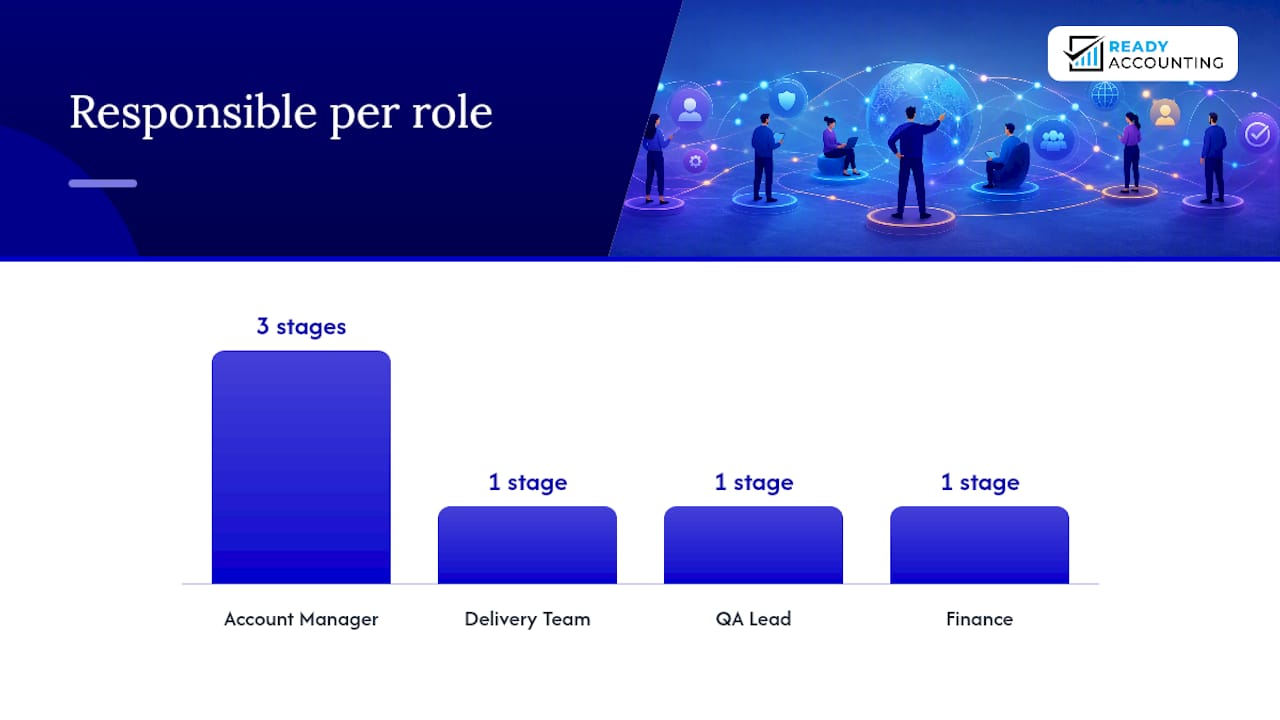
The point of this table is not bureaucracy. It is that every person on the team can answer “who decides this?” without sending a message.
OKR template
A simple OKR for a remote delivery team:
Objective: Deliver client projects on time and within scope in Q3.
Key Result 2: Client satisfaction score above 8/10 on post-delivery survey. Key Result 3: Zero scope-creep incidents without a signed change order.
Review OKR progress weekly in the team standup and monthly in the one-to-one. Adjust targets if the business context changes, but document the reason for any change.
How to hire, onboard, and equip remote employees so they contribute quickly
Hiring someone remotely and then leaving them to figure out the systems is one of the fastest ways to lose a good person in the first 90 days.
Remote hiring signals to look for
Not everyone thrives remotely. In interviews, look for:
- Evidence of self-directed work: ask candidates to describe a project they managed without daily supervision.
- Written communication quality: their email or application message tells you more than their answer to “are you a good communicator?”
- Comfort with async tools: have they used Slack, Asana, or similar platforms before?
Sample screening question: “Tell me about a time you had to solve a problem at work without being able to walk over to a colleague’s desk. What did you do?”
A second useful question: “How do you manage your own schedule when you have three competing deadlines?” The answer reveals whether they have a system or whether they wing it.
30/60/90-day onboarding template
Days 1–30 (learn):
- Complete system access setup (email, Slack, project tools, payroll portal).
- Meet every team member in a 30-minute one-to-one.
- Shadow two client calls or delivery processes.
- Complete any mandatory compliance training (POPIA awareness, data handling).
- Agree on first 30-day deliverable with manager.
Days 31–60 (contribute):
- Own one project or workstream independently.
- Attend weekly team standup and contribute updates.
- Complete first formal one-to-one with manager (review 30-day deliverable).
- Identify one process improvement and document it.
Days 61–90 (lead):
- Present one piece of work or insight to the broader team.
- Complete 90-day performance review with manager.
- Agree on OKRs for the next quarter.
- Confirm equipment setup is complete and signed off.
Equipment provisioning checklist
- Laptop or desktop (company-provided or BYOD with signed annex)
- UPS or power backup allowance
- Headset for video calls
- Secure VPN access configured
- MFA set up on all business systems
- Signed equipment acceptance form on file
- Access to HR and payroll portal confirmed
South African employer guidelines are clear that equipment provisioning and conduct expectations must be documented before the employee starts work, not after a problem arises.
How do you run performance reviews and career development remotely?
The shift from measuring hours to measuring outcomes is the single biggest mindset change for managers moving to remote work. It is also the one that takes the longest to stick.
Switching to output-based performance
Define what “good” looks like before the work starts. For a content writer, that might be four published articles per month with an average word count of 1,000 and a client satisfaction score above 7/10. For a developer, it might be sprint velocity, bug rate, and on-time delivery percentage. The metric matters less than the fact that both the manager and the employee agreed on it in advance.
A South African study of remote-working engineers found that performance is driven by communication, culture, and skills development rather than physical presence, and that junior staff in particular benefit from flexible mentorship and adaptive KPIs rather than rigid targets.
One-to-one agenda template
A 30-minute weekly one-to-one should cover:
- Check-in (5 min): How are you doing? Any personal or logistical issues affecting work?
- Progress review (10 min): What did you deliver this week against your targets?
- Blockers (5 min): What is slowing you down? What do you need from me?
- Development (5 min): What are you learning? What would you like to work on next?
- Next week (5 min): What are your three priorities for the coming week?
Career development for remote staff
Remote employees are often invisible when promotion decisions happen. Counter this deliberately:
- Assign remote staff to cross-functional projects where they present to senior leadership.
- Run a monthly “learning hour” where team members share something they have learned.
- Use project-based development: pair a junior employee with a senior one on a real deliverable, not a training module.
- Structured manager training, such as the Stanford Online course on managing remote and hybrid teams, gives managers a consistent framework for coaching and development conversations.
How do you build trust and wellbeing in a distributed team?
Culture does not happen by accident in a remote team. It happens because someone designs it.
Daily and weekly rituals
- Daily standup: 10 minutes, same time every day, structured format. Non-negotiable.
- Weekly wins post: every Friday, the manager posts three team wins in the main channel. Takes five minutes and costs nothing.
- Optional social call: 20 minutes on a Thursday afternoon. No agenda. No pressure to attend. Over time, the people who show up become the culture carriers.
- Recognition ritual: call out one specific contribution from a team member in every team meeting. Not generic praise (“great work this week”) but specific (“Thabo’s client brief saved us two revision rounds — that is the standard”).
Spotting burnout before it becomes a problem
Remote burnout looks different from office burnout. Watch for:
- A previously communicative team member going quiet in channels.
- Consistently late deliverables from someone who was previously reliable.
- Short, clipped responses in one-to-ones where there used to be conversation.
- Requests to skip the optional social call every week for a month.
When you see two or more of these signals together, address it directly in the next one-to-one. Not with “are you okay?” but with “I have noticed your energy seems lower lately. What is going on?”
Inclusion across South Africa’s multilingual teams
South Africa has 11 official languages and significant cultural diversity within a single team. A few practical steps:
- Agree on one working language for written communication (usually English) and stick to it in shared channels, so no one is excluded.
- Acknowledge cultural and religious observances in your team calendar. Asking is fine; assuming is not.
- Rotate who facilitates the weekly standup. It gives quieter team members a visible role and surfaces different communication styles.
Sage’s guidance on managing remote teams reinforces that trust, structured expectations, and intentional communication are the foundations of a remote team that actually works, not just survives.
How do you lead a remote sales team effectively?
Sales teams are the hardest to manage remotely because the work is inherently social, the feedback loop is long, and morale is directly tied to pipeline health.
Sales metrics to track remotely
- Activity KPIs: calls made, emails sent, demos booked per week per rep.
- Pipeline KPIs: pipeline coverage ratio (target: 3x quota in pipeline at any time), average deal size, and conversion rate from demo to close.
- Velocity KPIs: average sales cycle length and days since last activity on each open deal.
Review these weekly in a sales standup. The manager’s job in that meeting is not to interrogate but to remove blockers: “What do you need to move this deal forward?”
CRM hygiene for remote sales teams
Every interaction logged the same day. Every deal stage updated before the weekly standup. Every lost deal tagged with a reason. These three rules, enforced consistently, give a remote sales manager the visibility they need without micromanaging.
For async handoffs between SDRs (Sales Development Representatives) and account executives, use a standardised deal-handoff note in the CRM: company background, pain points identified, objections raised, and next agreed step. A handoff without this note should not be accepted.
Keeping morale during long sales cycles
- Pro Tip: Run a weekly “pipeline story” segment in your sales standup where one rep shares the context behind their most interesting active deal. It builds empathy, surfaces best practices, and breaks the monotony of metrics reviews.
- Celebrate activity milestones, not just closed deals. A rep who books 20 demos in a month deserves recognition even if none of them closed yet.
- Keep compensation plan communications simple and written. Remote reps who are uncertain about their commission structure disengage faster than office-based ones because they cannot walk over and ask.
South Africa–specific legal, payroll, and tax compliance for remote teams
This is the section most managers skip until something goes wrong. Do not be that manager.
Key compliance points
- Remote employees remain subject to your company’s disciplinary code. The Basic Conditions of Employment Act and the Labour Relations Act apply regardless of where the employee sits.
- Virtual disciplinary hearings are legally acceptable in South Africa, provided the employee receives proper written notice, has the opportunity to state their case, and the process is documented. Employer guidelines confirm that fairness and documentation are the two non-negotiables.
- Equipment issued to employees must be documented with a signed acceptance form. This protects both parties if the device is lost, damaged, or not returned.
- Allowances paid to remote employees (internet, electricity, equipment) may be taxable. Get clarity from a payroll specialist before paying them.
Home-office deductions: what SARS says
Under section 23(b) of the Income Tax Act, an employee may deduct home-office expenses only if:
- The room is used regularly and exclusively for work.
- The employee performs their duties mainly from that room.
- The employer has not already reimbursed those costs.
Deductible costs (apportioned by floor area) include rent or bond interest, rates and taxes, electricity, and repairs. Equipment depreciation is treated separately. Employees on straight salary (not commission-based) face a stricter test under SARS rules, so the Hirezar tax guide for South African remote workers is worth sharing with your team as a plain-language reference.
For practical guidance on managing employee expense claims and home-office allowances, Readyaccounting’s resource covers the documentation and reimbursement process in detail.
Payroll checklist for remote staff
- PAYE deducted and paid to SARS by the 7th of each month.
- UIF contributions (1% employee, 1% employer) processed monthly.
- SDL (Skills Development Levy) at 1% of payroll if your annual payroll exceeds R500,000.
- IRP5 certificates issued to all employees at tax year-end (February).
- Contractors paid without PAYE deduction must be registered for provisional tax and must submit their own returns. Confirm their tax status before the first payment. For more on payroll best practices for South African SMEs, Readyaccounting’s guide covers the full compliance cycle.
POPIA compliance for remote work
- Every remote employee who accesses personal information (customer data, HR records, financial data) must do so through a secure, access-controlled system.
- Device security policies must cover what happens to personal information stored on a device if the employee leaves or the device is lost.
- Data retention rules apply remotely: personal information must not be kept longer than necessary and must be deleted or anonymised when no longer needed.
- Document every data-access decision. If POPIA’s Information Regulator ever asks, your paper trail is your defence.
Pro Tip: Get every remote employee to sign a POPIA awareness acknowledgement as part of their onboarding. It takes five minutes and creates a documented record that they understood their obligations. Pair this with a POPIA compliance review if your business handles significant volumes of personal data.
What leadership behaviours actually work for remote teams?
The command-and-control manager who checks whether people are online at 8 AM is not managing a remote team. They are managing their own anxiety.
The shift from supervision to coaching
Remote leadership works when managers ask questions instead of issuing instructions. The practical difference:
- Supervision: “Why wasn’t this done by Friday?”
- Coaching: “What got in the way of Friday’s deadline, and what would you do differently next time?”
The second question gets you information. The first gets you defensiveness.
South African management research identifies a recurring ethical tension between control and autonomy in remote leadership, and the consistent recommendation is to shift toward coaching and mentorship rather than surveillance-based oversight.
Coaching prompts for one-to-ones
- “What is the most important thing you are working on right now, and what would make it easier?”
- “Where do you feel most confident in your role? Where do you feel least supported?”
- “If you could change one thing about how we work as a team, what would it be?”
Red flags that need escalation
- A team member misses two consecutive deadlines without flagging it in advance.
- Engagement drops sharply in team channels with no explanation.
- A team member stops attending optional team events entirely for more than three weeks.
- Quality of work declines noticeably without a stated reason.
When you see these, the response is a private conversation, not a public call-out. Address it in the next one-to-one with a direct but non-accusatory opening: “I want to check in properly today. I have noticed a few things and I want to understand what is going on.”
Public recognition and private coaching
Recognition in public, feedback in private. This is not a new idea, but remote teams need it more deliberately because there is no office floor where people can observe each other’s contributions. Call out specific wins in the team channel. Keep performance conversations, coaching, and any corrective feedback in a private one-to-one or direct message.

How do you measure remote-team productivity without micromanaging?
The answer is not more tracking software. It is better metrics.
Sample dashboard fields
- OKR progress: percentage of key results on track, at risk, or off track. Updated weekly.
- Delivery timelines: percentage of tasks delivered on or before the agreed date. Target: above 85%.
- Quality indicators: error rate, revision rounds, or client satisfaction score depending on the team’s function.
- Engagement pulse: a short weekly survey (one or two questions, anonymous) asking team members to rate their energy and workload. Tools like Officevibe or Culture Amp work for this.
- Absenteeism rate: unplanned leave as a percentage of working days. A spike here is often the first measurable sign of burnout.
Recommended reporting cadence
- Daily: standup covers blockers and progress verbally.
- Weekly: manager reviews delivery timeline and activity KPIs in writing.
- Monthly: one-to-one reviews OKR progress, quality indicators, and development goals.
- Quarterly: full OKR review with the team. Celebrate what was achieved, diagnose what was not, and set the next quarter’s targets.
Avoiding vanity metrics
Vanity metrics feel like data but tell you nothing useful. Hours logged, messages sent, and files uploaded are all vanity metrics for a remote team. The question to ask about any metric is: “If this number goes up, does the business actually get better?” If the answer is “not necessarily,” drop it.
Practical remote-team management guidance consistently points to shared systems and clear expectations as the foundation, not surveillance tools. Measure what matters and leave the rest.
Why remote team management is personal for us at Readyaccounting
At Readyaccounting, we work with South African SMEs and VC-backed startups that are scaling fast, often with teams spread across provinces or working from home full-time. The compliance questions we see most often are not about strategy. They are about the practical stuff: “Do I need to deduct PAYE differently for a remote employee?” “Can I give my team a home-office allowance and how do I document it?” “What happens if a remote employee is dismissed and we never had a signed remote-work policy?”
Johan, who leads the advisory work at Readyaccounting, has seen the downstream cost of skipping the compliance basics. A client who had not documented equipment provisioning spent three months in a CCMA dispute over a laptop. Another who paid internet allowances without checking the tax treatment ended up with a SARS query at year-end. The fix in both cases was simple documentation and a 30-minute conversation with a payroll specialist before the problem started.
Readyaccounting’s role is not just to file your returns. It is to make sure your remote-work setup, your payroll structure, and your expense policies are aligned from the start, so you are not solving avoidable problems at year-end. If your business is scaling with a remote team and you want to make sure the financial and compliance side is solid, cloud accounting automation is where most of our clients start.
Sources
The following primary sources informed this guide and are worth bookmarking for ongoing reference:
- Home office expenses | SARS
- Practical tips for managing remote workers | Human Resources
- Keeping remote teams aligned and engaged: a South African perspective
- Managing Remote and Hybrid Teams | Course | Stanford Online
This article is general information, not a substitute for advice from a qualified financial advisor. Consult a qualified financial professional about your own circumstances before acting on anything here.